
Distance Doesnt Mean Disconnected Senior Safety Call Buttons
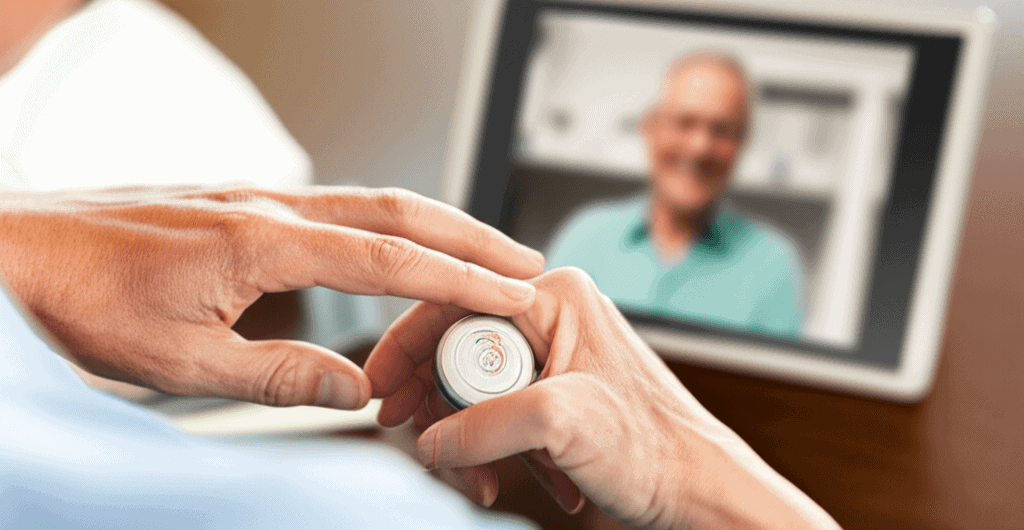
Distance does not have to make families feel distant when looking after older adults. Living far from loved ones means creating a strong safety plan becomes super important. Senior safety call buttons offer an easy way for older adults to stay protected without changing their daily habits. Picture the relief of knowing help waits nearby with just one press—that calm feeling is priceless. Folks who live far from family get the biggest boost from these devices because they add real comfort and security without any hassle. Keep reading to find out how this small gadget could totally transform care for your loved ones.
In this article I explain how emergency call buttons for seniors work, what types are available, how to choose one that fits your household, and practical steps for using these devices to maintain independence while staying connected to caregivers and responders. Expect real examples, helpful tips, and actionable advice you can use right away.
How senior safety call buttons keep families connected and responsive
Emergency call buttons act as a direct line between a senior and a designated contact or monitoring center. The device does not replace personal contact but it reduces the time between an incident and a human response. That difference matters in falls and sudden medical events where minutes change outcomes.
Beyond emergency use these devices offer routine reassurance. A device with two way voice lets a senior speak with a responder in seconds. A wearable button can reduce anxiety about being alone for short trips around the home. A station mounted on a wall can provide coverage for common areas like living rooms.
Common types of senior safety call buttons and how they work
There are several device styles to consider. Each style matches different living patterns and mobility levels. Knowing the options helps match a device to real needs.
- Wearable button worn as a pendant or wrist band that connects by radio or cellular signal.
- Home base systems that link to a landline or cellular hub with a wearable transmitter.
- Mobile GPS enabled devices for seniors who leave the house often.
- Smart home integrated buttons that link to existing home speakers or security systems.
Most units fall into monitored or unmonitored categories. Monitored systems contact a live responder or call list when the button is pressed. Unmonitored setups call predetermined numbers like family members. Both approaches have strengths depending on response preferences and budget.
Key factors when choosing a senior safety call button
Selecting the right system requires attention to living arrangements mobility and communication preferences. Consider these factors as you compare models.
- Range and coverage in a house or apartment.
- Power requirements battery life and charging needs.
- Two way voice to talk with a responder without reaching a phone.
- Water resistance for bathroom safety.
- Ease of use single button operation and clear feedback such as lights or tones.
- Subscription fees for monitored service and what response is included.
Signal range and reliability
Range matters for larger homes or homes with thick walls. Radio frequency and cellular units behave differently in the presence of concrete walls or metal framing. Test a device in key locations such as the bathroom bedroom and garage to verify coverage before committing.
Response options and planning
Decide whether a professional monitoring center is preferable over a family call list. Professional monitoring offers a 24 hour contact but has a monthly fee. Family response often costs less but requires clear plans so a call does not go unanswered during work hours or travel.
Practical setup steps for meaningful remote support
Installing a call button is simple. The planning around it takes a bit more time and pays off in reliability. Start by mapping daily routines and high risk situations such as stairs baths and medication times. Use that map to place devices and outline response roles for family or neighbors.
For families managing care from a distance consider building routines that blend technology with human contact. For example schedule brief check ins after certain activities and keep a rotating list of responders who can arrive in person if needed. For more on ways to coordinate care from afar consider these remote caregiving tips.
Daily check in and emergency drills
Create a predictable check in pattern such as a morning call after medication and an evening touch base after dinner. Run a monthly drill where the senior presses the button and everyone practices the response. Drills confirm device function and keep everyone familiar with the plan.
Medication and fall response integration
Link the button plan with medication schedules and fall risk mitigation. If a senior has a higher fall risk consider placing additional stationary buttons near common fall sites. Coordinate with primary care providers to make sure responders know about medical conditions and medication lists.
Real life examples that show impact
Example 1 A retired teacher living two hours away from her daughter wore a pendant device. One evening she tripped in the kitchen and could not reach a phone. When she pressed the pendant a monitoring center confirmed her condition and contacted emergency services. The daughter arrived shortly after and reported that the quick response reduced hospital time and stress.
Example 2 A man with limited mobility used a GPS enabled mobile button. While visiting friends he experienced dizziness and pressed the button. A family member was alerted and located him quickly through the device. The faster check in meant medical evaluation happened sooner and avoided a prolonged wait.
These real outcomes show how a small device can shorten response times and preserve independence by letting seniors stay in familiar surroundings while still having help close at hand.
Cost considerations and long term upkeep
Monthly fees vary with monitoring level and features. Basic unmonitored setups can be low cost while 24 hour monitoring with emergency dispatch comes with a monthly subscription. Look beyond upfront device price to account for batteries charging needs and potential replacement every few years.
- Check warranty and replacement policies.
- Compare trial periods to test how a device fits daily life before a long term commitment.
- Calculate annual cost including subscription batteries and any extra devices for larger homes.
Maintenance includes regular battery checks clearing debris from charging contacts and validating cellular reception. Build reminders into a calendar so maintenance does not get overlooked.
Tips for encouraging acceptance and regular use
Resistance to new devices is common. Focus on comfort and transparency and involve the senior in choosing the device. Try these practical tips to increase use.
- Let the senior pick the style and color where options exist.
- Practice using the device together until it feels natural.
- Frame the device as a way to stay independent rather than as a sign of decline.
- Keep the button visible and easy to reach with common placements like near a favorite chair.
- Use positive reinforcement when the device is used correctly and not as a chore.
How to coordinate with emergency services and health providers
Inform local emergency services if a monitored system is in use so dispatchers have context. Share medical details medication lists and preferred hospitals with the monitoring center when possible to speed care. It is also helpful to let primary care providers know about the device and the response plan so coordination during an event is smoother.
Consider adding a medical alert decal near the entry to the home that indicates a response plan is in place. That can help first responders locate key information quickly and reduce delays during an emergency.
Distance Doesnt Mean Disconnected Senior Safety Call Buttons are a practical tool families can use to preserve independence reduce response times and give remote caregivers confidence that help is available. These devices come in multiple styles to fit different lifestyles and budgets. Choosing the right system involves matching coverage battery life and response preferences to the seniors daily routines. Once installed regular drills and clear response roles make the system reliable in practice.
If you are evaluating options start with a short trial of one device test it in the places that matter most and set up a repeatable check in routine. Make sure family members or neighbors understand their roles and keep documentation such as medical information and contact lists accessible to responders. Taking these steps can make technology a real partner in safe independent living.
Ready to take the next step Assess the needs of your loved one choose a device to test and schedule a trial period. If you want help reviewing models or building a response plan reach out to local providers and ask about demos. Small actions now can reduce stress later and help loved ones keep living on their terms.
 Durability Of Large Units
  School Campus Maintenance Requirements
  Quit Hesitating on Financial Debt
  Great Spots For Boat Tours
  Industrial Tools Leasing Solutions
  Tax Savings Help Retirement Planning